RocketPlay Registration, Login and Account Access
 Available in AU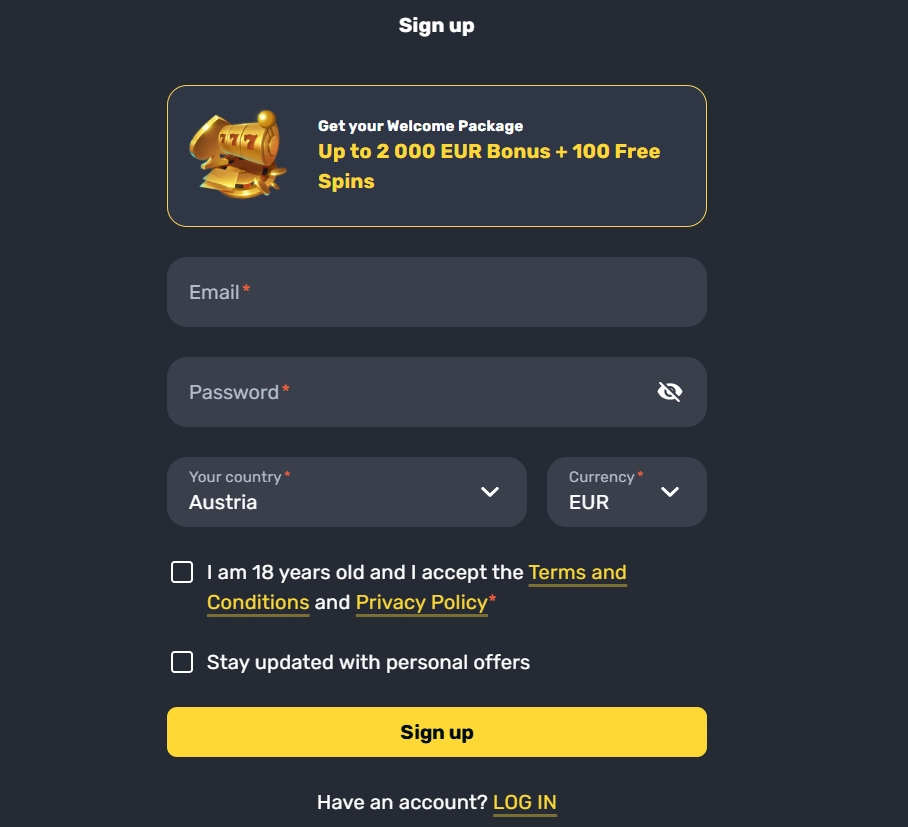
Content
RocketPlay’s account flow starts with the Sign Up control, followed by the information requested in the registration interface and an email-confirmation step. The official FAQ says a confirmation link is sent after registration and must be clicked to confirm the account. Existing users sign in with their account credentials, while forgotten-password recovery is handled through the “Forgot Password?” link and an email reset link. The Australian version uses an en-AU locale and presents relevant content and account information in AUD.
Registration should be kept separate from KYC. Creating and confirming an account is one process; identity or payment verification can be requested later as part of account controls. Exact document requirements and verification timing can change, so they are covered separately in the verification section. The key account-access points are the visible sign-up, login, recovery and support routes.
Where registration begins
RocketPlay’s own FAQ directs new users to the “Sign Up” button in the top area of the site. From there, the user fills in the required information shown by the current registration flow. A fixed list of fields from an old interface capture or third-party guide can quickly become inaccurate. Registration forms are product interfaces and can be changed, reordered or localised without notice.
The Australian-facing version of RocketPlay uses an en-AU locale, and AUD is a supported account currency. That makes the localisation visible, but it should not be stretched into a claim that the site holds an Australian gambling licence or falls under Australian-licensed casino consumer protections. Account localisation and regulatory licensing are separate questions.
Before submitting a registration, users should read what the live form actually asks for and ensure the email address is under their control. Email matters immediately because RocketPlay’s documented activation path uses a confirmation link sent after sign-up. A typo at this stage can turn a simple registration into an avoidable support problem.
Email confirmation is part of account activation
According to RocketPlay’s current FAQ, the account confirmation process uses email. After registration, an email with a confirmation link is sent to the address supplied during sign-up. Clicking that link completes the confirmation step described by the operator.
If the activation message does not arrive, RocketPlay tells users first to check whether the email address entered at registration is correct and then to check the spam folder. The FAQ also points users to live chat if the activation email still cannot be found. That is more reliable than creating another account, especially because RocketPlay separately says duplicate accounts are not permitted under its account rules.
The practical lesson is simple: preserve access to the registration email and complete confirmation before assuming an account problem is a password problem. Email confirmation, login credentials and later KYC can all involve identity-related information, but they are different stages and should not be merged into one vague “verification” step.
Logging in after the account has been created
For returning users, the relevant action is sign-in rather than registration. The account should be accessed from RocketPlay’s official site or the verified mobile/PWA route rather than through an unfamiliar login page reached from an untrusted download or advertisement. This matters because casino login pages handle credentials and often sit close to financial account functions.
Once signed in, the account becomes the common point for features such as profile settings, wallet access and other account controls exposed by the site. The exact layout can change, so button positions may differ even when the underlying account controls remain the same. If using a phone, the same account can be reached through the browser or the official PWA route described in the mobile access.
Users should also distinguish login from wallet currency. RocketPlay’s FAQ states that currencies can be managed from the profile and identifies AUD among the supported currencies. That does not mean every payment method or promotion is automatically available merely because the account displays AUD; payment and bonus eligibility are separate parts of the service.
Password recovery: use the documented reset route
RocketPlay’s FAQ provides a straightforward password-recovery path. Select “Forgot Password?” and the service sends an email containing a link to create a new password. If the reset email does not arrive or the process cannot be completed, the operator directs users to support.
This is preferable to repeated guessing, opening a new account, or following third-party instructions that ask for credentials outside the official RocketPlay environment. A password reset should stay inside the account recovery flow. If the user no longer remembers which email address was used, RocketPlay’s FAQ says support can assist after checking account details.
For an email-address change, the FAQ likewise points to support rather than presenting a self-service shortcut. That keeps several common access problems under one rule: when the account cannot be recovered through the normal email reset, move to the operator’s documented support path instead of improvising around the login system.
Registration is not the same as KYC
RocketPlay’s public FAQ says account verification may be required on request. That establishes the existence of a later verification process, but it should not be confused with the initial sign-up and email-confirmation flow. A user can therefore encounter several distinct stages: entering registration details, confirming the email address, signing in, using account features, and later responding to a verification request when applicable.
KYC document requirements and verification timeframes are covered separately from ordinary account-access instructions because they concern a different stage of account use. The KYC and verification guide explains that process, while registration, login and account recovery remain separate account-access topics.
Keeping the distinction clear also improves troubleshooting. A failed login is not automatically a KYC issue, and a verification request is not automatically a password issue. Identify the stage first, then use the relevant recovery or support path.
How deposits and bonuses relate to account access
Creating an account is the gateway to the cashier and promotions, but those areas have their own rules. RocketPlay’s Australian-facing material supports AUD, while the site’s payment and bonus sections contain separate limits, eligibility conditions and offer terms. Registration itself does not prove that a specific payment method or promotional offer will be available to every account.
If the immediate goal is to understand the first-deposit promotion rather than account mechanics, the welcome bonus keeps those terms separate. The same separation is useful for payments: a confirmed account can still see a cashier selection that depends on currency, method or account state.
Keeping these functions separate makes account access easier to understand: sign-up and login sit here, while bonus and cashier details are covered in their relevant sections once those features become available after sign-in.
See also RocketPlay Bonuses and Promotions for Australia .
Account access on mobile
RocketPlay supports mobile-browser access and documents a Progressive Web App installation flow. That means registration, sign-in and recovery can be approached from a phone without treating the mobile version as a separate account system. The PWA is an access method to the web service, not a second identity or wallet.
On iPhone, RocketPlay’s PWA instructions use Safari and “Add to Home Screen.” On Android, they use Chrome and the equivalent home-screen installation option. Users who already have an account should therefore expect account access to remain tied to their existing credentials rather than creating a new mobile-only registration.
If a mobile shortcut behaves unexpectedly, opening RocketPlay directly in the browser is a useful diagnostic step. If login fails in both places, move to password recovery or support. If only the shortcut fails, the issue is more likely related to the local browser/PWA environment than to the account itself.
Support routes for activation and access problems
The operator’s FAQ specifically sends users to live chat for missing activation messages, forgotten login email details and account email changes, while password recovery begins with the automated reset link.
When contacting support, the useful approach is to describe the access stage precisely: registration submitted but no confirmation email, password-reset email missing, registered email forgotten, or signed-in account behaving unexpectedly. This is better than sending broad messages such as “login does not work,” because the documented remedies differ by problem.
Support should also be used instead of attempting to bypass access restrictions. Attempts to evade ISP blocks, geolocation controls or regulatory restrictions are outside normal account access. The appropriate options are the official account experience and the operator’s own recovery routes.
A clean account-access checklist
- Start from RocketPlay’s official site and use the visible Sign Up control for a new account.
- Enter only the information requested by the live registration interface rather than relying on an old third-party field list.
- Use an email address you can access and complete the confirmation link sent after registration.
- For later access, use the normal sign-in route on the official site or verified mobile/PWA access.
- If the password is forgotten, use “Forgot Password?” and follow the reset email.
- If activation or recovery email does not arrive, check the address and spam folder before contacting support.
- Treat any later KYC request as a separate verification stage, not as part of ordinary login.
This sequence keeps account mechanics easy to diagnose. It also avoids importing assumptions from unrelated casino sign-up flows, where the exact fields, identity checks and wallet setup can differ.
What the account flow means in practice
RocketPlay’s documented account path is conventional: use Sign Up, complete the required live form, confirm the account by email, and return through the normal sign-in route. Password recovery is handled through “Forgot Password?” and an emailed reset link.
The most important distinction is between access and verification. Registration, email confirmation and login are not the same as KYC, and KYC requirements should be taken from the current account request rather than assumed in advance. RocketPlay Registration, Login and Account Access — More on this topic at rocket play casino .
This material was created by the RocketPlay Guide team.
Related posts
RocketPlay Withdrawals: Limits, Timing and Verification
RocketPlay Pokies for Australian Players